
Manistee County VINELink Coverage
Michigan is available through VINELink. VINE receives custody data from participating state and local agencies. It may show a person who is in custody or was recently released, and it can send automated notice of offered custody events. The reporting facility controls the underlying facts. VINE passes those facts through and cannot edit them.
No static official list proved that Manistee County Jail participation is current. Check the live Michigan agency choices or search the person, then call the official jail at 231-723-8435 when the source is missing or unclear. Oaks Correctional Facility belongs to MDOC, not the Sheriff. Its prison, parole, and discharge status should also be checked in OTIS.
Search Manistee County VINELink
Gather enough information to avoid a name-only match. The live Michigan interface can offer name, ID number, or case number searches. Available fields can change with the interface. An optional control may display offender photos when a source has supplied one. A photo is only another identity clue and may not be present.
- Open the Michigan VINELink route and choose Search for Someone.
- Enter the full name, ID number, or case number that the live search offers. Use the most exact identifier available.
- Select “Display offender photos in search results (if available)” only when a photo will help distinguish matches.
- Complete the CAPTCHA and submit the search.
- Compare more than the name. Check identifiers, reporting agency, facility, and any other facts shown.
- Open the correct record and note the custody status plus event date and time.
- If the record says released, confirm the disposition with the reporting facility when the exact event matters.
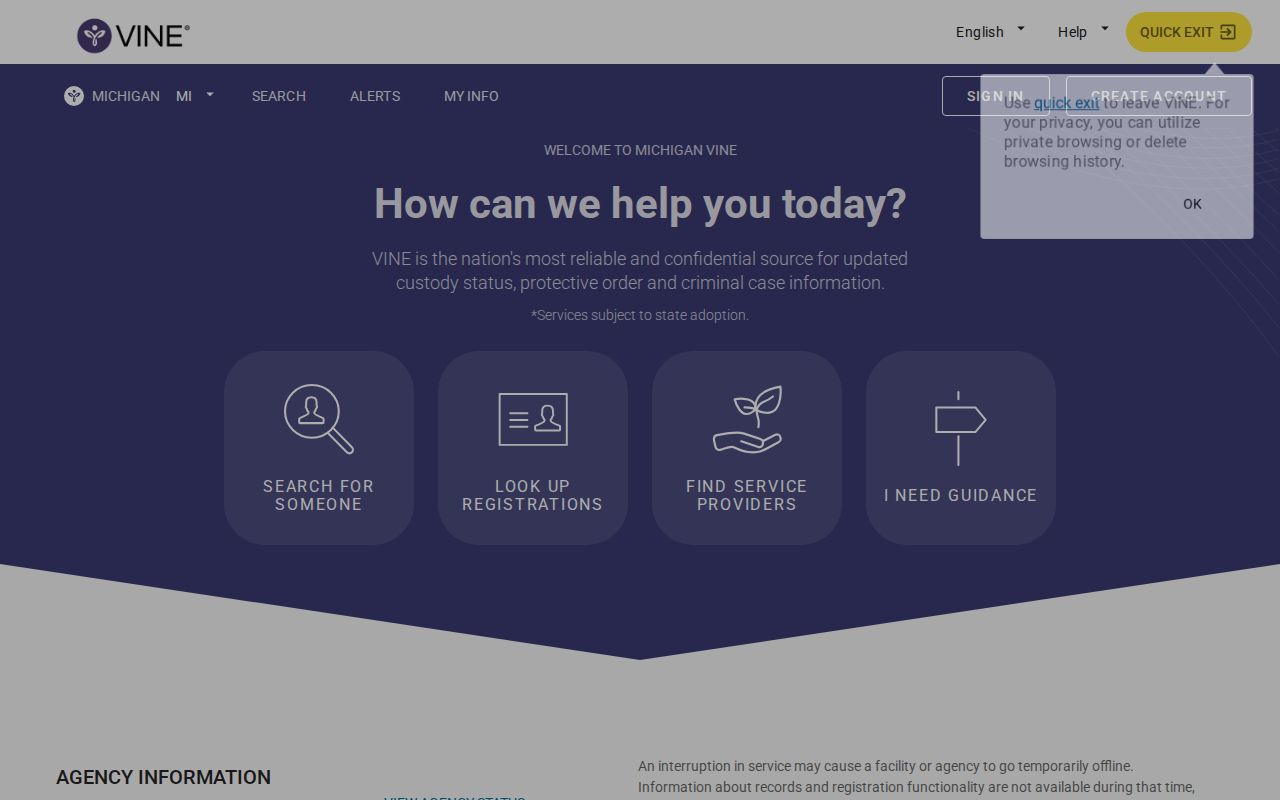
The official Michigan landing screen is shown below. It documents the state route and “Search for Someone” entry point rather than a stored person record.
The official Michigan VINE source supplied this captured search screen.
Search results depend on the live reporting connection. Record the time checked because custody and source availability can change.
Note: If several people share a name, stop until an ID, case number, birth detail, or reporting agency separates the records.
Manistee VINELink Release Fields
VINE fields vary by source and record. The verified research supports the fields below as possible Michigan search or result elements. It does not support a universal retention window for recently released people, and it does not promise a photo or every field on every record.
| VINELink element | How to read it |
|---|---|
| Name, ID, or case search | Locates candidates; it does not by itself prove identity. |
| Reporting agency | Names the source that sent the custody information. |
| Facility | Identifies the location tied to the reported record or event. |
| Custody status | States the source agency’s current or recent status label. |
| Event date and time | Dates the agency-fed custody change shown in the record. |
| Photo, if supplied | May help match identity but is not guaranteed or proof of release. |
A released event means exit from the reporting agency. It does not rule out transfer, a later arrest, parole, probation, federal custody, or immigration custody. When Manistee County Jail is the source, ask the jail whether the event was community release or transfer. When MDOC is the source, compare the person’s OTIS status and Date Paroled or discharge information.
Register Manistee Release Alerts
Finding a record is not the same as registering for notice. Open the correct person first. Then choose the notification or registration option offered for that record. Methods can include email, SMS text, telephone or TTY, and in-app notice. Event choices also vary. Select only the custody events the system presents, such as release or status change.
- Open the matched person record and select its notification or registration control.
- Choose the available email, text, phone, TTY, or in-app method. More than one method is safer when offered.
- Select the release, transfer, or other custody events available for that record.
- Enter the destination phone number, email address, or account details requested by the service.
- Create the requested four-digit PIN. A PIN may be needed for text and is used to acknowledge telephone alerts.
- Enter the confirmation code delivered by email or text when the account flow asks for it.
- Keep the PIN. For a phone alert, listen to the message and enter the four-digit PIN followed by #.
Acknowledging a phone call stops repeat calls for that event. Calls that are not answered or acknowledged may repeat for an interval set by the state service. A verified account may support a universal PIN across registrations. VINE’s service support number is 1-866-277-7477 and is available around the clock.
Watch Is Not Release Notice
VINE’s official FAQ distinguishes “Watch” from registration. Watching a person record alone does not send custody-change alerts. Complete the notification setup, confirm the chosen delivery method, and retain the PIN. After setup, check that the record and contact destination are correct.
- Watch
- A record-following feature that does not, by itself, register custody-change alerts.
- Registration
- The completed choice of events and delivery methods for notifications.
- PIN
- A four-digit code used in supported registration and phone acknowledgement steps.
- Acknowledgement
- The action that confirms a telephone event message was received and stops repeats for that event.
Prefer two notification methods when the record offers them. A missed call, filtered text, changed address, or account issue can defeat a single route. VINE notice is useful, but it is not a substitute for contacting the source when a planned pickup or formal confirmation depends on the event.
Note: Keep the registration PIN private and update contact details when they change, or an alert may not reach the intended recipient.
Live Manistee VINE Agency Check
Manistee County requires an extra coverage step because no current static participation list was verified. First inspect the live Michigan search or agency selector. If a Manistee source appears, search the person and read the reporting-agency label on the record. If it does not appear, if the search fails, or if the source shows an outage, call Manistee County Jail’s 24/7 corrections line.
During a source outage, both custody lookup and registration may be unavailable. Data can update after the connection returns. Do not translate a temporary blank screen into release. The official VINE help directs users back to the source facility when a record is missing or wrong, which is why the jail fallback is part of the Manistee process rather than a last resort.
Manistee County Jail Check
1525 E. Parkdale Ave.
Manistee, MI 49660
Corrections: 231-723-8435
Available 24 hours a day
Match Manistee Custody Systems
VINELink is one layer, not a universal locator. A local booking that never led to an MDOC sentence may never appear in OTIS. A person who left Manistee County Jail for Oaks or another state facility should be checked in OTIS after the state record updates. A person released on parole has left secure prison custody but remains under MDOC supervision. A discharged status means the relevant MDOC supervision ended.
| Custody type | Primary follow-up | Meaning of release |
|---|---|---|
| Manistee County Jail | Jail movement record, court, live VINE | Exit may be community release or transfer |
| MDOC prison or supervision | OTIS, MDOC office, MDOC records | Parole differs from final discharge |
| Federal BOP | BOP Inmate Locator | Exit from BOP does not end all custody or supervision |
| Federal pretrial or ICE | Federal docket and USMS, or ICE locator | Movement between agencies is not community release |
VINE does not replace the BOP locator for sentenced federal prisoners. No federal or ICE correctional facility was found as physically located in Manistee County, but a person from the county can still be held elsewhere. Follow legal custody, not the county where the case began.
Confirm Manistee VINELink Releases
For a county-jail event, call the jail and ask whether the person is still physically held. If not, ask for the actual exit date and whether the disposition was release or transfer. A court register or signed order can explain bond, dismissal, sentence, probation, or commitment to MDOC, but the jail owns its movement time. The MiCOURT search covers the court layer.
If the person moved into state custody, open OTIS and compare the MDOC number, status, sentence county, facility or supervision location, Date Paroled, and discharge data. OTIS generally retains public profiles for three years after supervision discharge, while VINE gives no universal recently released retention period. For a jail record that cannot be confirmed by phone, use the Sheriff FOIA channel.
The full Manistee County released-inmate lookup sets out the broader court, jail, state, and federal path. For a VINELink check, preserve the reporting agency, facility, event wording, event time, and time searched. Those details show what the result actually proves.
Correct Manistee VINE Records
VINE cannot change an agency’s custody fact. Route a wrong jail status to Manistee County Jail. Route an MDOC status to the appropriate MDOC source or supervising office. If the issue comes from a court judgment, MDOC directs the correction to the sentencing court. The data owner must fix the source before a later VINE transmission can reflect the change.
State the error precisely. Include the person identifier, reporting agency, disputed status or event, date checked, and the source record that supports correction. Avoid sending extra personal details that are not needed. If the problem is technical registration or notification delivery rather than custody data, use VINE support at 1-866-277-7477.
A corrected court or facility record may not appear in VINELink at once. Check the owning source first, then return to VINE after its agency connection updates.
Note: Save the reporting agency and event time before seeking correction because VINE support cannot alter the facility’s underlying custody record.